Sources
Sources are objects that are used to generate rays. Every instrument must have a Rays object which tells it how to make an initial Rays object. The following classes are found within the file:
Creating a Source
Each Source subclass takes additional arguments, but these arguments are shared by all Source objects.
- num - The length of the Rays object that this source will generate, defaults to 1000.
- z - The initial z-position of the photons. Changing this parameter when initializing the Source object is the same as adding a misalignment in z.
- z must be in units of length, see the section on Astropy Units.
- wave - The wavelength of the photons in the Rays object.
- wave must be in an astropy units that can be converted to nanometers. This means that energies are also accepted (i.e: the wave argument can be given in eV, but the Rays object this Source creates will always measure the wavelength in nm).
- order - The order of the photons in the Rays object that this source will generate.
Note: wave and order both default to None. If these values are left as None, the photons will not be correctly diffrected by Gratings, but can be traced to other objects successfully.
Also, if the wave and order of a Source have not been defined when the Source was initialized but you wish to add them later, the parameters values can still be changed. If you have a source “s”, you can access the wavelength parameter using s.wave, and you can access the order parameter using s.order. Note that any wavelength added in this manner must still be an astropy unit, but it will not be automatically converted to nanometers, this must be done by the user.
Using Existing Rays
Often, you will want to send rays from one instrument to another. Instruments must be initialized with a source, so if you have an existing Rays object which you would like to start with, you need to be able to create a Source from these Rays. This is done with the function Source.sourceFromRays(), which takes arguments:
- rays - When this new Source is called to generate rays, this is the object that it will generate.
Note that the rays object stored is not a copy, modifying the rays object you passed to this function may modify the rays produced by the Source object.
Example: Create a Source which will generate a blank Rays object:
from prtp.Rays import Rays
from prtp.Sources import Source

r = Rays()

s = Source.sourceFromRays(r)
Misalignments
Almost all sources are originally centered around the origin and pointing upwards. But this is unacceptable for some applications. Luckily, the Source class can transform Rays automatically.
Misalignments are generated using the function addMisalignment(), which takes the following arguments:
- dx, dy, dz - These arguments describe how much each ray must be moved in x, y, and z.
- dx, dy, and dz must be in units of length, see the section on Astropy Units.
- dl, dm, dn - These arguments describe how much each ray must be rotated about the x, y, and z, axes, respectively. Note that these differ from most component rotations in which rotate and unitrotate simply change the vectors of the component without translating the component. These rotations will physically move the photons around the axes, similar to the rotation functions for Combination objects. See the example below to see how rotations work.
- dl, dm, and dn must be in angular units, see the section on Astropy Units.
Note: linear translations (dx, dy, and dz) are performed first, then the rotations are performed in a right-handed manner.
Example: Below we generate a CircularBeam Source first with default alignment, and then with both a translation and a rotation.
from prtp.Sources import CircularBeam
import astropy.units as u

s = CircularBeam(num=1000,rad=2*u.mm)

rays = s.generateRays()

rays.scatter3d()

s.addMisalignment(dx=5*u.mm,dm=30*u.deg)

rotatedrays = s.generateRays()

rotatedrays.scatter3d()
Note that the call to addMisalignment() is performed after initialization, but before rotatedrays are generated, misalignments will not affect the Rays after they’ve been generated.
When this code is executed, it produces the following plot, first of the default Rays:
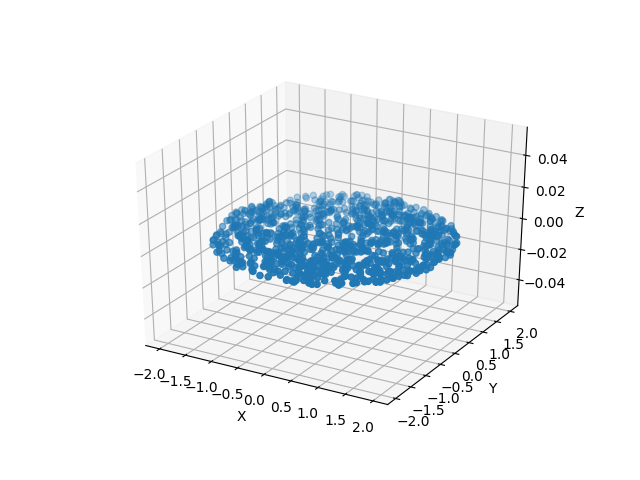
Note that the center of the beam is at position (x,y,z) = (0,0,0).
Then the code produces a plot of the misaligned rays:
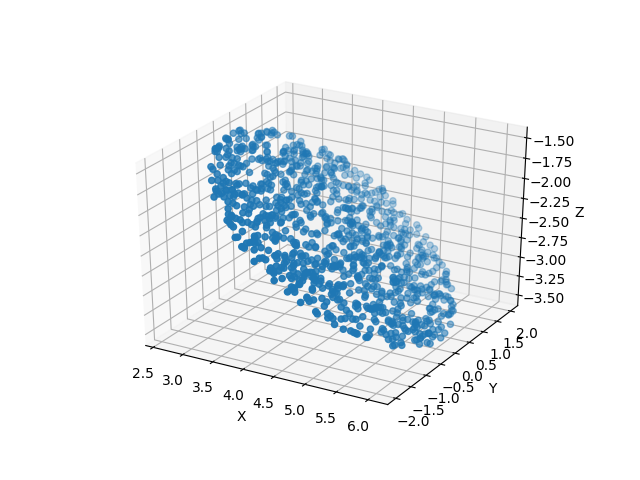
Note that the center of the beam is no longer at the origin. We can see from the call to s.addMisalignment() that our rays were moved along the x-axis, then rotated about the y-axis. Though not visible from these plots, the direction of propagation of the photons has also been transformed.
Generating Rays
Getting a Rays object from an initialized Source only requires a call to the function generateRays(), which takes no arguments and returns the Rays object. For an example of its use, see the code block in the section above.
Annulus
An Annulus is a Source which generates photons in a donut shape, all of the photons have the same direction. In addition to num, z, wave, and order, Annulus takes the following arguments:
- rin - The inner radius of the photons, defaults to 1 mm
- rin must be in units of length, see the section on Astropy Units
- rout - The outer radius of the photons, defaults to 2 mm
- rout must be in units of length, see the section on Astropy Units
- zhat - This argument specified the z-component of the photons’ velocities. It should be -1 is the photons are pointing in the -x direction and should be 1 if the photons are travelling in the +x direction. Defaults to -1.
Example:
from prtp.Sources import Annulus
import astropy.units as u

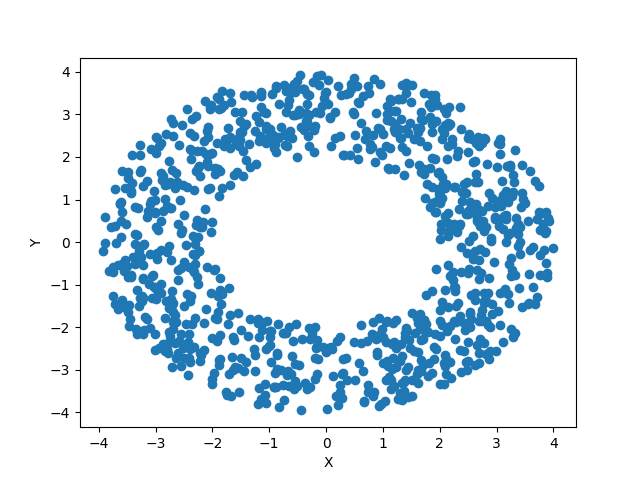
s = Annulus(rin=2*u.mm,rout = 4*u.mm,wave=3*u.J,order=1)

rays = s.generateRays()

rays.scatter2d()
Note that the wavelength is given in Joules, this shows that wavelength can be given in either units of length or energy.
This code block generates the following plot:
CircularBeam
A CircularBeam is a Source which generates photons in a circle, all of the photons have the same direction. In addition to num, z, wave, and order, CircularBeam takes the following arguments:
- rad - The radius of the circular beam, defaults to 1 mm.
- rad must be in units of length, see the section on Astropy Units
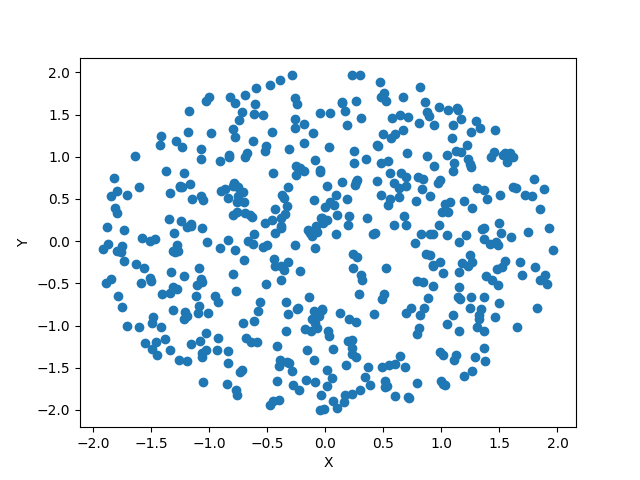
Example:
from prtp.Sources import CircularBeam
import astropy.units as u

s = CircularBeam(num=500,rad = 2*u.mm)

rays = s.generateRays()

rays.scatter2d()
This code block generates the following plot:
ConvergingBeam
A ConvergingBeam is a Source which generates a sup-apertured annulus beam with specified inner and outer radii. In addition to num, z, wave, and order, ConvergingBeam takes the following arguments:
- zset - This parameter descibes the convergence of the beam in the z-dimension. A Source defined with zset = 1m will priduce rays with an initial z-position of 1m, but they will converge at z=0. The z argument in this case will translate the initial rays up or down from zset if it is specified. For example, if zset = 1m and z=.1m, the rays will start at z=1.1m and converge at z=0.1m.
- zset must be in units of length, see the section on Astropy Units
- rin - The inner radius of the sub-apertured annulus beam, defaults to 0 mm
- rin must be in units of length, see the section on Astropy Units
- rout - The outer radius of the sub-apertured annulus beam, defaults to 1 mm
- rout must be in units of length, see the section on Astropy Units
- tmin - The minimum angular extent of the sub-apertured annulus beam, defaults to 0 rad
- tmin must be in units of angle, see the section on Astropy Units
- tmax - The maximum angular extent of the sub-apertured annulus beam, defaults to 1 rad
- tmax must be in units of angle, see the section on Astropy Units
- lscat - The scatter in the angular convergence, defaults to 0 arcsec
- lscat must be in units of angle, see the section on Astropy Units
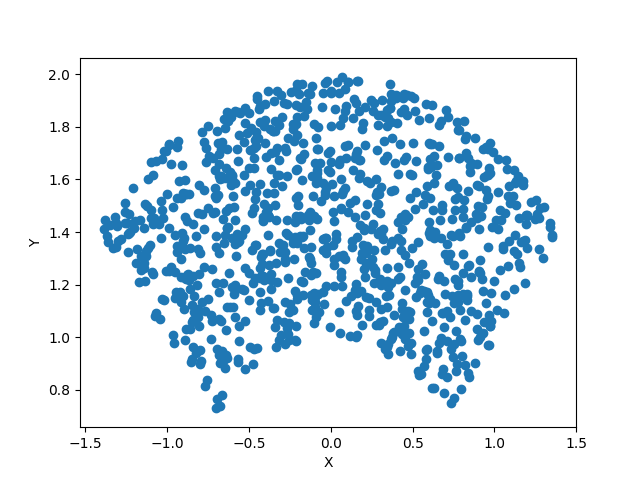
Example:
from prtp.Sources import ConvergingBeam
import astropy.units as u

s = ConvergingBeam(zset=1*u.m,rin=1*u.mm,rout=2*u.mm,
   tmin=45*u.deg,tmax=135*u.deg,lscat=2*u.arcsec)

rays = s.generateRays()

rays.scatter2d()
This code block generates the following plot:
To show that it converges, we will trace the rays from their initial position at z=1m to a blank collimator plate at z=0.5m:
from prtp.CollimatorPlate import CollimatorPlate
# use the rays object we defined previously

col = CollimatorPlate(0*u.cm,0*u.mm,50*u.cm,
   0,0,1,0,1,0,l=5*u.mm,w=5*u.mm)
col.trace(rays)

rays.scatter2d()
This code block will produce a plot showing that the pattern of the rays has indeed moved closer to the origin:
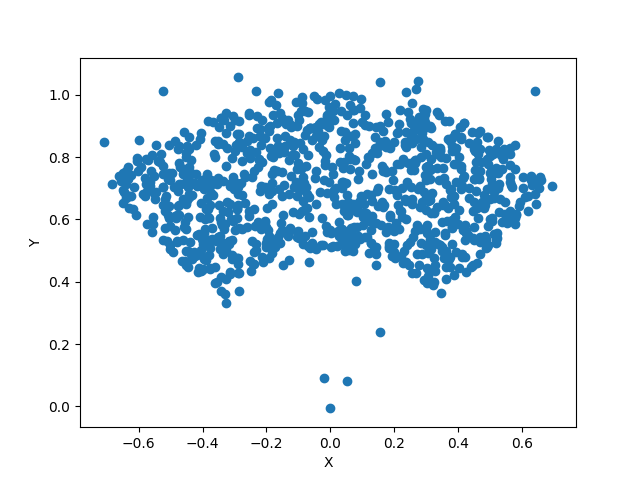
Note that some of the rays have moved out from the pattern entirely, this is due to the lscat parameter. If we had set lscat to 0mm, all of the rays would maintain their original positions in the pattern.
ConvergingBeam2
A ConvergingBeam2 is a Source which generates a rectangular beam that converges in the x and the y dimensions. In addition to num, z, wave, and order, ConvergingBeam2 takes the following arguments:
- zset - This parameter descibes the convergence of the beam in the z-dimension. A Source defined with zset = 1m will priduce rays with an initial z-position of 1m, but they will converge at z=0. The z argument in this case will translate the initial rays up or down from zset if it is specified. For example, if zset = 1m and z=.1m, the rays will start at z=1.1m and converge at z=0.1m.
- zset must be in units of length, see the section on Astropy Units
- xmin - The minimum extent of the beam in the x-direction, defaults to 0 mm
- xmin must be in units of length, see the section on Astropy Units
- xmax - The maximum extent of the beam in the x-direction, defaults to 1 mm
- xmax must be in units of length, see the section on Astropy Units
- ymin - The minimum extent of the beam in the y-direction, defaults to 0 mm
- ymin must be in units of length, see the section on Astropy Units
- ymax - The maximum extent of the beam in the y-direction, defaults to 1 mm
- ymax must be in units of length, see the section on Astropy Units
- lscat - The scatter in the angular convergence, defaults to 0 arcsec
- lscat must be in units of angle, see the section on Astropy Units
Example:
from prtp.Sources import ConvergingBeam2
import astropy.units as u

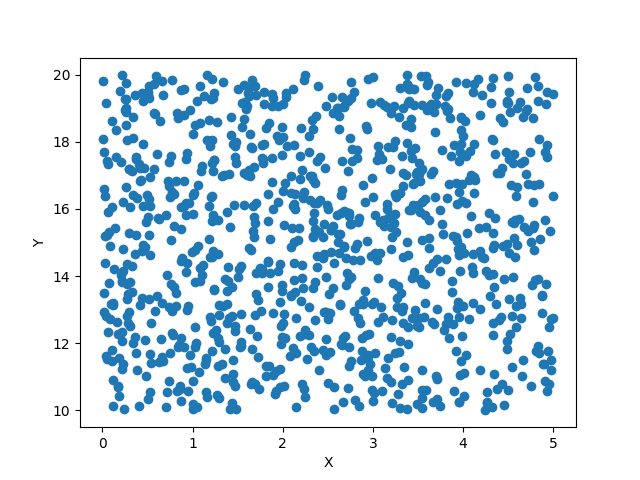
s = ConvergingBeam2(zset=1*u.m,xmin=0*u.mm,xmax=5*u.mm,
   ymin=10*u.mm,ymax=20*u.mm,lscat=0*u.arcsec)

rays = s.generateRays()

rays.scatter2d()
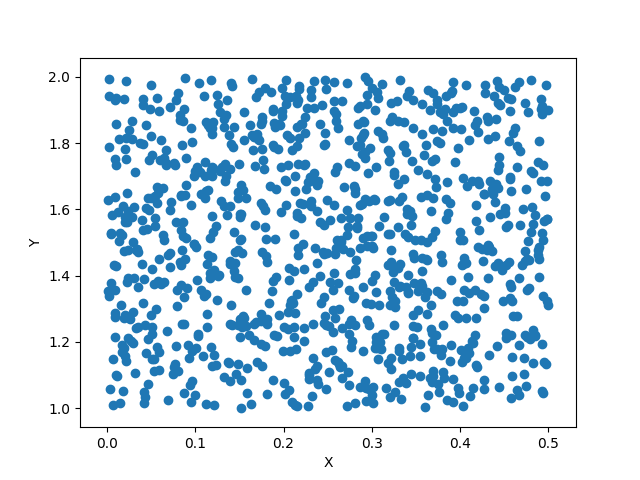
This code block produces the following plot, note the dimensions of the rectangle along the axes:
To show that the rays converge, we will trace them onto a blank Collimator Plate at z=.1m, note that the zset value makes our rays have an initial z-position of 1m.
This code block produces the following plot, notice how the dimensions of the rectangle have become smaller as our rays begin to converg:
PointSource
A PointSource is a Source which generate rays which start at the origin but propagate outward with a specified angular divergence. In addition to num, z, wave, and order, PointSource takes the following arguments:
- ang - The angular divergence of the rays
- ang must be in units of angle, see the section on Astropy Units
Example:
from prtp.Sources import PointSource
import astropy.units as u

s = PointSource(ang = 1*u.deg)

rays = s.generateRays()

rays.scatter2d()
This code block generates the following plot:
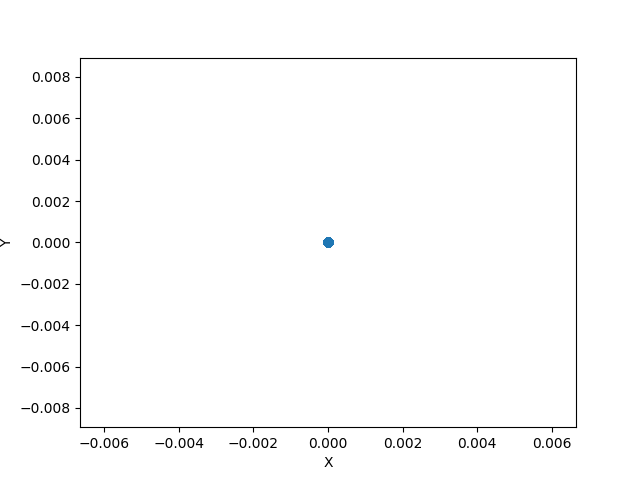
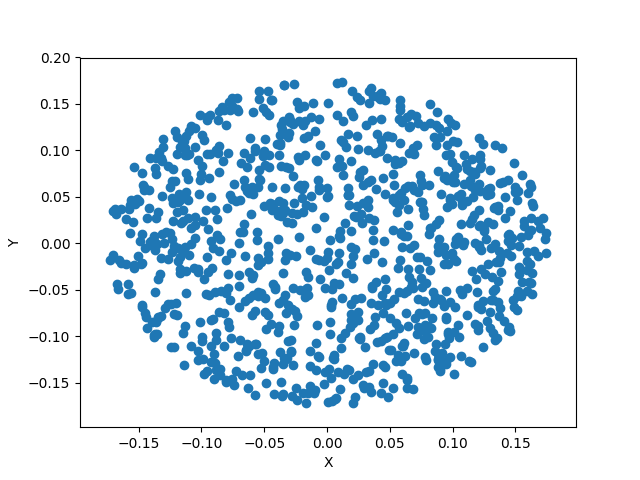
Certainly all of the rays are generated to begin in the same point, but by tracing them further in the z-direction, we can see how the rays diverge:
from prtp.CollimatorPlate import CollimatorPlate
# Use the rays we defined previously

col = CollimatorPlate(0*u.cm,0*u.mm,10*u.mm,0,0,1,0,1,0)
col.trace(rays)

rays.scatter2d()
This code block generates the following plot:
RectArray
A RectArray is a Source which generates a rectangular beam with a specified width and height, unlike other Sources, the photons here are evenly spaced, rather than randomly generated. In addition to num, z, wave, and order, RectArray takes the following arguments:
- xsize - Half the length in the x-direction. For example, if xsize is 5 mm, the rectangular array will extend from -5 mm to 5 mm in the x-direction.
- xsize must be in units of length, see the section on Astropy Units.
- ysize - Half the length in the y-direction. For example, if ysize is 5 mm, the rectangular array will extend from -5 mm to 5 mm in the y-direction.
- ysize must be in units of length, see the section on Astropy Units.
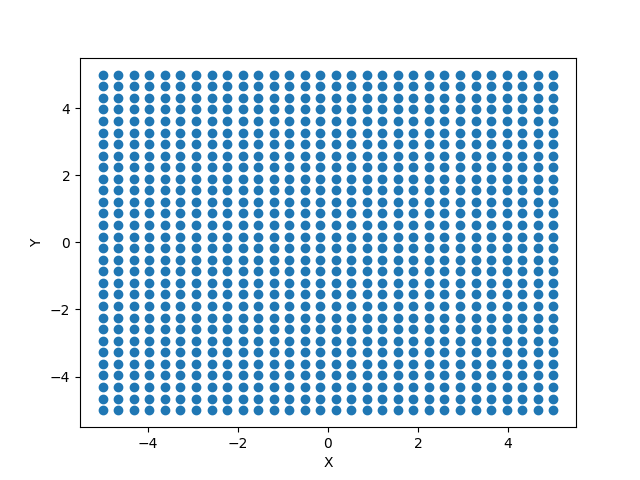
Note: Unlike other Sources, num does not specify the number of photons in the resulting Rays object. Since this Source has evenly spaced photons, num gives how many photons are along one side of the array, so the total number of photons in the array will be num-squared. The num argument in RectArray defaults to 100 while it defaults to 1000 in most other Source objects.
Example:
from prtp.Sources import RectArray
import astropy.units as u

s = RectArray(num=30,xsize = 5*u.mm,ysize = 5*u.mm)

rays = s.generateRays()

rays.scatter2d()
This code block generates the following plot:
RectBeam
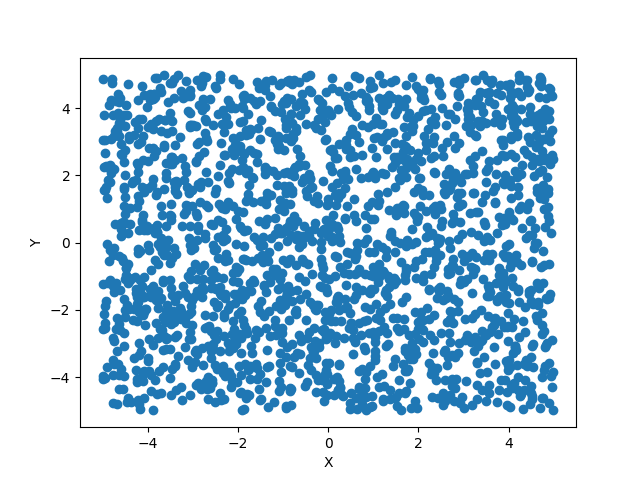
A RectBeam is a Source which generates a rectangular beam with a specified width and height, unlike RectArray, these photons are randomly generated within the rectangle. In addition to num, z, wave, and order, RectArray takes the following arguments:
- xhalfwidth - Half the length in the x-direction. For example, if xhalfwidth is 5 mm, the rectangular array will extend from -5 mm to 5 mm in the x-direction.
- xhalfwidth must be in units of length, see the section on Astropy Units.
- yhalfwidth - Half the length in the y-direction. For example, if yhalfwidth is 5 mm, the rectangular array will extend from -5 mm to 5 mm in the y-direction.
- yhalfwidth must be in units of length, see the section on Astropy Units.
Example:
from prtp.Sources import RectBeam
import astropy.units as u

s = RectBeam(num=2000,xhalfwidth = 5*u.mm,yhalfwidth = 5*u.mm)

rays = s.generateRays()

rays.scatter2d()
This code block generates the following plot:
Subannulus
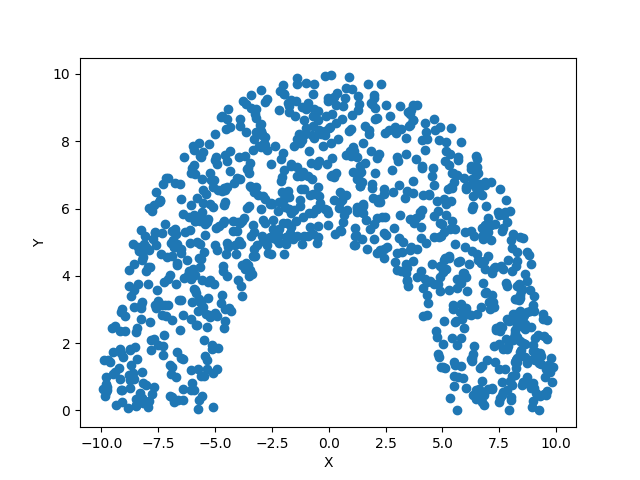
A Subannulus is a Source which generates photons which occupy only a portion of a full annulus. The subannulus is always symmetric about the positive y-axis, but has a angular width that can be specified. In addition to num, z, wave, and order, RectArray takes the following arguments:
- rin - The inner radius of the annulus. * rin must be in units of length, see the section on astopy units
- rout - The outer radius of the annulus * rout must be in units of length, see the section on astopy units
- dphi - The full angular width of the subannulus. phi = 0 is always defined as the positive y-axis. So if dphi was set to 60 degrees, the subannulus would extend 30 degrees below and 30 degrees above the y-axis. * dphi must be in units of angle, see the section on astopy units
- zhat - This argument specified the z-component of the photons’ velocities. It should be -1 is the photons are pointing in the -x direction and should be 1 if the photons are travelling in the +x direction. Defaults to +1.
Example:
from prtp.Sources import Subannulus
import astropy.units as u

s = Subannulus(rin=5*u.mm,rout=10*u.mm,dphi=180*u.deg)

rays = s.generateRays()

rays.scatter2d()
This code block generates the following plot:
Xslit
An Xslit is a Source which generates photons which are equally spaced along the x-axis in a slit with a given width. In addition to num, z, wave, and order, Xslit takes the following arguments:
- xin - The inner position of the slit. * xin must be in units of length, see the section on astopy units
- xout - The outer position of the slit * xout must be in units of length, see the section on astopy units
- zhat - This argument specified the z-component of the photons’ velocities. It should be -1 is the photons are pointing in the -x direction and should be 1 if the photons are travelling in the +x direction. Defaults to -1.
Example:
from prtp.Sources import Xslit
import astropy.units as u

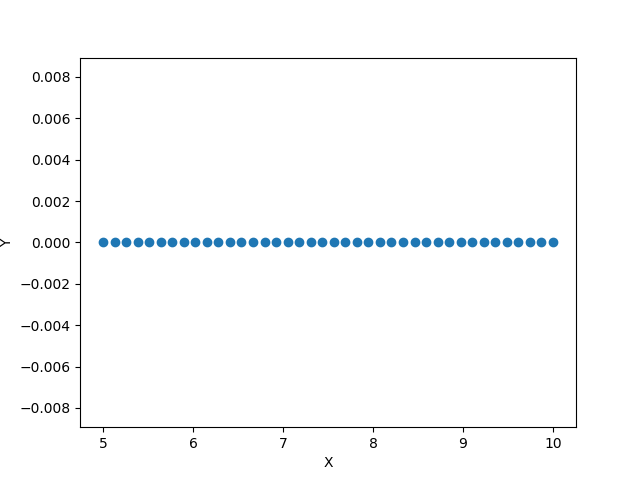
s = Xslit(num=40,xin=5*u.mm,xout=10*u.mm)

rays = s.generateRays()

rays.scatter2d()
This code block generates the following plot: