Combination
Combinations are used when you wish to trace rays to more than one component at a time. Due to the nature of Combinations, photons can only hit one of the Components included in a Combination. As such, they should be used when photons will hit no more than one of the Components. For example, a Wolter Type One Mirror is not a Combination since photons hit the primary, then the secondary mirror. A detector array, however, would be an excellent use for a Combination, as each photon will hit one of the Detectors, or will miss entirely.
There are two types of Combinations which are specialized for their specific purposes. WolterModules have a special initialization syntax that allows them to be generated while automatically containing all of the mirrors they need. Grating Stacks have two types of traces that can only be used when a Combination contains only Flat Components, so these traces cannot be used for a generic Combination Object
Initializing a Combination
Generic Combinations are initialized without any arguments. The initialization process creates a Combination object that has a single parameter known as “componentlist” which is simply a list containing all of the components.
Initializing a Combination object is very easy:
from prtp.Combination import Combination
c = Combination()
Adding Components
If you have some Combination object c, you can modify it directly by accessing the list as “c.componentlist” But accessing the list directly can be risky, it is easy to change the list unexpectedly. A safer way to add components is with the addComponent() function. This function takes two arguments:
- comp - The Component you wish to add to the Combination.
- index - The index at which you wish to add the Component. This argument defaults to None, in which case the Component will be appended to the end of the list. For example, if index was set to 3, the component will either be added at index 3 (with later components pushed back) or at the end of the componentlist if it had a length less than 3.
Example:
from prtp.Combination import Combination
from prtp.CollimatorPlate import CollimatorPlate
from prtp.Grating import Grating

comb = Combination()

c0 = CollimatorPlate()
c1 = CollimatorPlate()
c2 = CollimatorPlate()

g = Grating()

comb.addComponent(c0)

# Without an index argument, the component will be added at the end
comb.addComponent(c1)

# If the index argument is too large, the component
# will be added at the end
comb.addComponent(c2,index=100)

# Add the Grating to be the second item in the list
comb.addComponent(g,index=1)
Apply to All
applyToAll() is a function that allows the user to perform some action on every component in a Combination without using a loop or accessing the componentlist. It takes arguments:
- func - The function you wish to apply
- kwargs - The arguments that are required by func.
- Some functions require that their inputs are astropy quantities, check the arguments the function requires to see what form kwargs should be in.
Example:
If a Combination c is filled with Flat Components, you can perform unitrotate on each Component with the following syntax:
c.applyToAll(FlatComponent.unitrotate,theta=20*u.deg,axis=2)
Get Sub-Components
As discussed before, the list of components contained within this Combination can be accessed with c.componentlist (if c is an initialized Combination object). However, sometimes one or more of these components will be a Combination, and sometimes it is necessary to retrieve the components inside of that Combination.
Suppose that you had a Combination that contained two GratingStacks, and each GratingStack contained ten Gratings. Calling c.componentlist will only give you the two Grating Stacks. If you wanted to perform some complicated operation on every Grating, you could access these using the getSubComponents() function.
Setting Attributes
The function setAttribute allows you to change the value of a certain parameter for every Component in this Combination. setAttribute() takes the following arguments:
- name - The name of the parameter you wish to change
- value - The value to which you would like to change the parameter.
- Note: This function cannot check for astropy units, check what form the parameter should be in before you call this function.
Example:
Suppose we have a Combination that Contains CollimatorPlates, but we have not yet set the collision function, but we want to make sure they all have CollimatorPlate.wires as a collision function, we can do so with the following lines of code:
# Suppose the Combination c is filled with CollimatorPlates
c.setAttribute('collisionfunction',CollimatorPlate.wires)
c.setAttribute('sep',1*u.mm)
c.setAttribute('thickness',0.5*u.mm)
In-Place Motion
In-place motion means that each component is moved individually. Other motion functions will move the entire Combination. There are two function which deal with in-place rotation.
Note that for all motion functions we will be using the following Combination which is defined by placing two Collimator Plates next to each other:
from prtp.Combination import Combination
from prtp.Sources import CircularBeam
import astropy.units as u

c = Combination()
col = CollimatorPlate(4*u.mm,0*u.mm,3*u.mm,
   0,0,1,0,1,0,l=3*u.mm,w=3*u.mm)
c.addComponent(col)
col = CollimatorPlate(0*u.mm,0*u.mm,3*u.mm,
   0,0,1,0,1,0,l=3*u.mm,w=3*u.mm)
c.addComponent(col)

s = CircularBeam(num=10000,rad=6*u.mm)
rays = s.generateRays()
c.trace(rays)

rays.scatter3d()
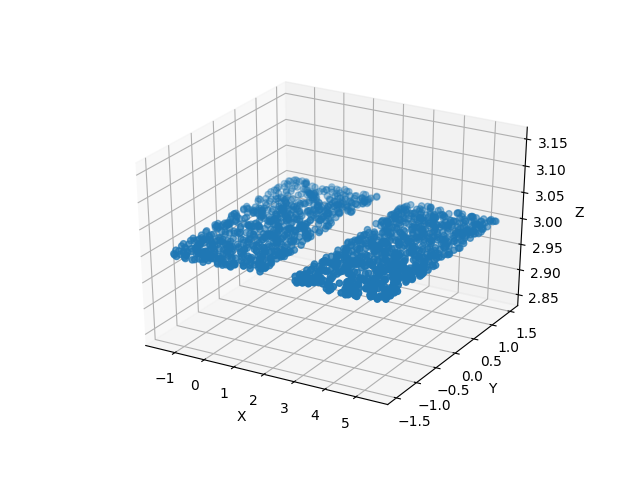
This code block lets us see what the Collimator Plates look like:
Unitrotateinplace
The function unitrotateinplace calls unitrotate on every component in the Combination. This means that the centers of the components will not be moved, but their surface and normal vectors will be rotated (if applicable).
unitrotateinplace takes the same arguments as unitrotate:
- theta - The angle that you would like to rotate. Can be a single value if you want to rotate each component the same amount. Can also be a tuple, list or numpy array the same length as this Combination’s componentlist. In this case, each component will be rotated a unique amount.
- theta should be in units of angle, see the section on Astropy Units.
- axis - The axis about which you want to rotate. 1, 2, and 3 specify the x, y, and x axes, respectively.
Example:
from prtp.Combination import Combination
from prtp.Sources import CircularBeam
import astropy.units as u

c = Combination()
col = CollimatorPlate(4*u.mm,0*u.mm,3*u.mm,
   0,0,1,0,1,0,l=3*u.mm,w=3*u.mm)
c.addComponent(col)
col = CollimatorPlate(0*u.mm,0*u.mm,3*u.mm,
   0,0,1,0,1,0,l=3*u.mm,w=3*u.mm)
c.addComponent(col)

c.unitrotateinplace(theta=20*u.deg,axis=2)

s = CircularBeam(num=10000,rad=6*u.mm)
rays = s.generateRays()
c.trace(rays)

rays.scatter3d()
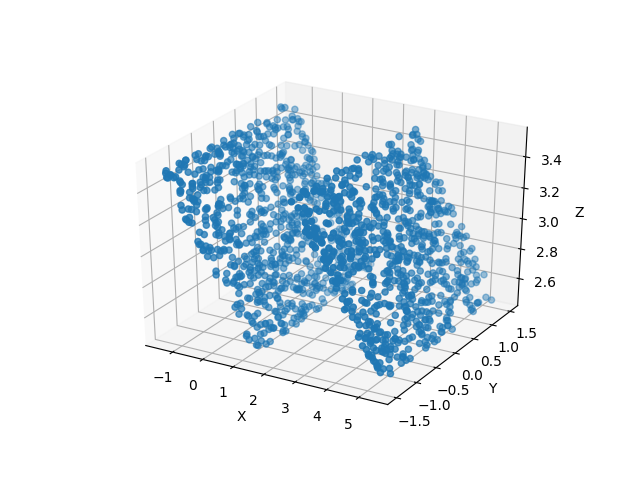
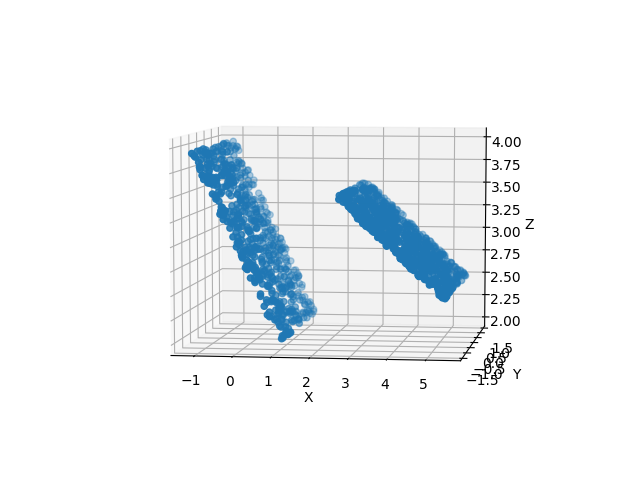
That example rotated both Collimator Plates 20 degrees. But, by passing in a list of theta values, we can rotate each component a separate angle:
from prtp.Combination import Combination
from prtp.Sources import CircularBeam
import astropy.units as u

c = Combination()
col = CollimatorPlate(4*u.mm,0*u.mm,3*u.mm,
   0,0,1,0,1,0,l=3*u.mm,w=3*u.mm)
c.addComponent(col)
col = CollimatorPlate(0*u.mm,0*u.mm,3*u.mm,
   0,0,1,0,1,0,l=3*u.mm,w=3*u.mm)
c.addComponent(col)

# Note the list syntax, we need to add the unit to the list,
# we cannot just use a list of values with units
# c.unitrotateinplace(theta=[20*u.deg,40*u.deg]) would not work
c.unitrotateinplace(theta=[20,40]*u.deg,axis=2)

s = CircularBeam(num=10000,rad=6*u.mm)
rays = s.generateRays()
c.trace(rays)

rays.scatter3d()
Rotateinplace
The function rotateinplace calls rotate on every component in the Combination. This means that the centers of the components will not be moved, but their surface and normal vectors will be rotated (if applicable).
rotateinplace takes the same arguments as rotate:
- theta - The angle that you would like to rotate. Can be a single value if you want to rotate each component the same amount. Can also be a tuple, list or numpy array the same length as this Combination’s componentlist. In this case, each component will be rotated a unique amount.
- theta should be in units of angle, see the section on Astropy Units.
- ux,uy,uz - These three parameters define the axis about which you want to rotate
Example:
from prtp.Combination import Combination
from prtp.Sources import CircularBeam
import astropy.units as u

c = Combination()
col = CollimatorPlate(4*u.mm,0*u.mm,3*u.mm,
   0,0,1,0,1,0,l=3*u.mm,w=3*u.mm)
c.addComponent(col)
col = CollimatorPlate(0*u.mm,0*u.mm,3*u.mm,
   0,0,1,0,1,0,l=3*u.mm,w=3*u.mm)
c.addComponent(col)

c.rotateinplace(theta=20*u.deg,ux=1,uy=1,uz=0)

s = CircularBeam(num=10000,rad=6*u.mm)
rays = s.generateRays()
c.trace(rays)

rays.scatter3d()
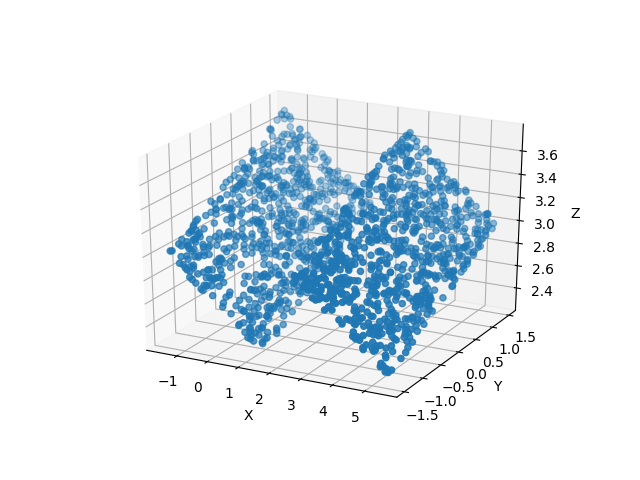
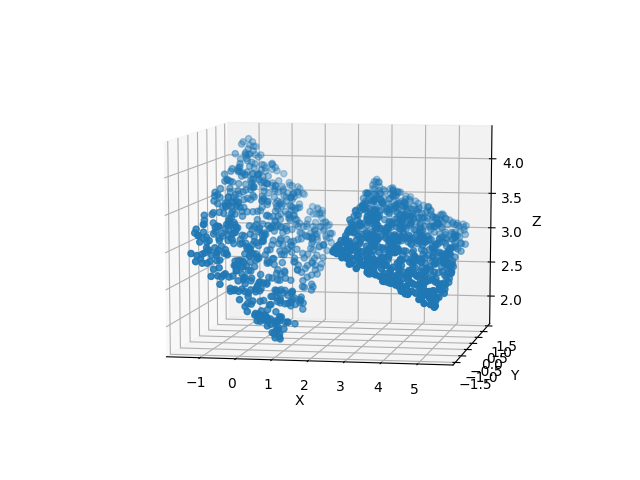
That example rotated both Collimator Plates 20 degrees about the axis <1,1,0>. But, by passing in a list of theta values, we can rotate each component a separate angle:
from prtp.Combination import Combination
from prtp.Sources import CircularBeam
import astropy.units as u

c = Combination()
col = CollimatorPlate(4*u.mm,0*u.mm,3*u.mm,
   0,0,1,0,1,0,l=3*u.mm,w=3*u.mm)
c.addComponent(col)
col = CollimatorPlate(0*u.mm,0*u.mm,3*u.mm,
   0,0,1,0,1,0,l=3*u.mm,w=3*u.mm)
c.addComponent(col)

# Note the list syntax, we need to add the unit to the list,
# we cannot just use a list of values with units
# c.rotateinplace(theta=[20*u.deg,40*u.deg]) would not work
c.rotateinplace(theta=[20,40]*u.deg,ux=1,uy=1,uz=0)

s = CircularBeam(num=10000,rad=6*u.mm)
rays = s.generateRays()
c.trace(rays)

rays.scatter3d()
Bulk Motion
While In-place motion moves each component in the combination individually, bulk motion moves the entire combination.
For bulk motion examples we will be using the same Combination we used for in-place motion, which is two adjacent Collimator Plates:
from prtp.Combination import Combination
from prtp.Sources import CircularBeam
import astropy.units as u

c = Combination()
col = CollimatorPlate(4*u.mm,0*u.mm,3*u.mm,
   0,0,1,0,1,0,l=3*u.mm,w=3*u.mm)
c.addComponent(col)
col = CollimatorPlate(0*u.mm,0*u.mm,3*u.mm,
   0,0,1,0,1,0,l=3*u.mm,w=3*u.mm)
c.addComponent(col)

s = CircularBeam(num=10000,rad=6*u.mm)
rays = s.generateRays()
c.trace(rays)

rays.scatter3d()
This code block lets us see what the Collimator Plates look like:
Translate
Combination.translate() functions as one would expect it to, there is no difference between in-place translation and bulk translation so only one function exists. This function iterates through every component in the Combination and translates it. translate() takes the following arguments:
- dx - The amount by which you want to move the components in the x-direction, defaults to 0 mm.
- dx must be in units of length, see the section on Astropy Units
- dy - The amount by which you want to move the components in the y-direction, defaults to 0 mm.
- dy must be in units of length, see the section on Astropy Units
- dz - The amount by which you want to move the components in the z-direction, defaults to 0 mm.
- dz must be in units of length, see the section on Astropy Units
Example:
from prtp.Combination import Combination
from prtp.Sources import CircularBeam
import astropy.units as u

c = Combination()
col = CollimatorPlate(4*u.mm,0*u.mm,3*u.mm,
   0,0,1,0,1,0,l=3*u.mm,w=3*u.mm)
c.addComponent(col)
col = CollimatorPlate(0*u.mm,0*u.mm,3*u.mm,
   0,0,1,0,1,0,l=3*u.mm,w=3*u.mm)
c.addComponent(col)

c.translate(dx=1*u.mm,dy=1*u.mm,dz=-1*u.mm)

s = CircularBeam(num=10000,rad=6*u.mm)
rays = s.generateRays()
c.trace(rays)

rays.scatter3d()
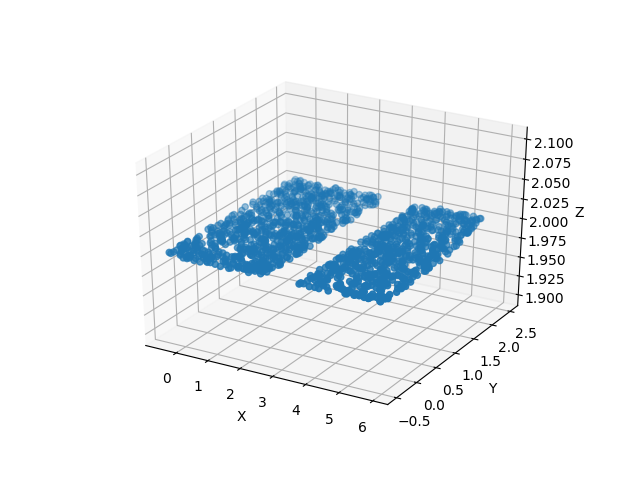
Note that the Collimator Plates are oriented in the same way, but their centers have been moved from where they previously were.
Defining a Rotation Point
Warning
Attempting to perform bulk rotation (unitrotate or rotate) without first defining a rotation point will raise an error.
When we were looking at in-place motion, each component was rotated about its center. But now we are rotating each component about a point. Obviously, we need to define a rotation point in order to perform bulk rotations. This is done with the function defineRotationPoint() function, which takes the following arguments:
- x,y,z - The x, y, and z positions of the rotation point, respectively. They all default to 0 mm.
- These arguments must all be in units of length, see the section on Astropy Units
Example:
from prtp.Combination import Combination
import astropy.units as u

# Initialize a blank Combination object
c = Combination()

# Define the rotation point at <x,y,z> = <1,2,3> mm
c.defineRotationPoint(x=1*u.mm,y=2*u.mm,z=3*u.mm)
Unit Rotate
The function unitrotate() rotates the entire Combination about one of the unit axes.
This function takes the same arguments as unitrotate for an individual component:
- theta - The angle that you would like to rotate. Can be a single value if you want to rotate each component the same amount. Can also be a tuple, list or numpy array the same length as this Combination’s componentlist. In this case, each component will be rotated a unique amount.
- theta should be in units of angle, see the section on Astropy Units.
- axis - The axis about which you want to rotate. 1, 2, and 3 specify the x, y, and x axes, respectively.
Example:
from prtp.Combination import Combination
from prtp.Sources import CircularBeam
import astropy.units as u

c = Combination()
col = CollimatorPlate(4*u.mm,0*u.mm,3*u.mm,
   0,0,1,0,1,0,l=3*u.mm,w=3*u.mm)
c.addComponent(col)
col = CollimatorPlate(0*u.mm,0*u.mm,3*u.mm,
   0,0,1,0,1,0,l=3*u.mm,w=3*u.mm)
c.addComponent(col)

c.defineRotationPoint()
c.unitrotate(theta=45*u.deg,axis=1)

s = CircularBeam(num=10000,rad=6*u.mm)
rays = s.generateRays()
c.trace(rays)

rays.scatter3d()
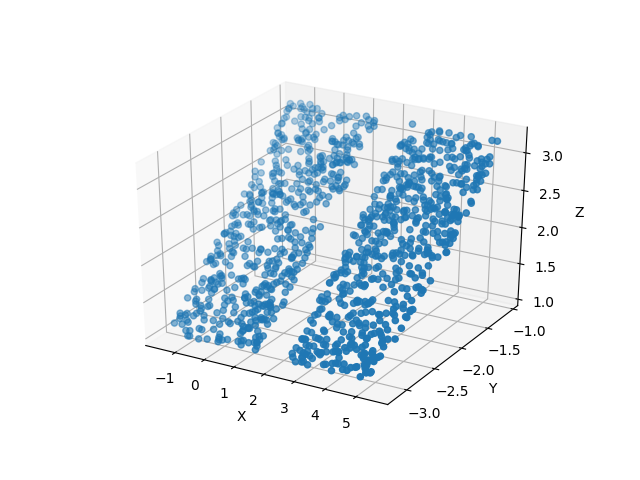
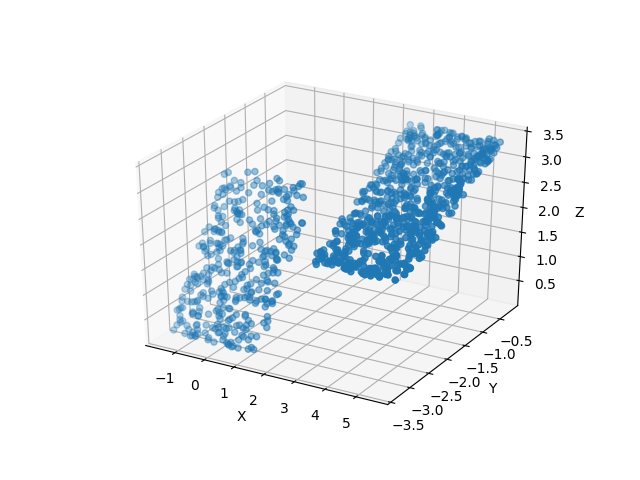
That example rotated both Collimator Plates 45 degrees, note that the centers of the Plates are not in the same place, they have also been rotated. By passing in a list of theta values, we can rotate each component a separate angle:
from prtp.Combination import Combination
from prtp.Sources import CircularBeam
import astropy.units as u

c = Combination()
col = CollimatorPlate(4*u.mm,0*u.mm,3*u.mm,
   0,0,1,0,1,0,l=3*u.mm,w=3*u.mm)
c.addComponent(col)
col = CollimatorPlate(0*u.mm,0*u.mm,3*u.mm,
   0,0,1,0,1,0,l=3*u.mm,w=3*u.mm)
c.addComponent(col)

c.defineRotationPoint()

# Note the list syntax, we need to add the unit to the list,
# we cannot just use a list of values with units
# c.unitrotate(theta=[30*u.deg,60*u.deg]) would not work
c.unitrotate(theta=[30,60]*u.deg,axis=1)

s = CircularBeam(num=10000,rad=6*u.mm)
rays = s.generateRays()
c.trace(rays)

rays.scatter3d()
Rotate
The function rotate() rotates the entire Combination about a user-defined axis.
This function takes the same arguments as rotate for an individual component:
- theta - The angle that you would like to rotate. Can be a single value if you want to rotate each component the same amount. Can also be a tuple, list or numpy array the same length as this Combination’s componentlist. In this case, each component will be rotated a unique amount.
- theta should be in units of angle, see the section on Astropy Units.
- ux,uy,uz - These three parameters define the axis about which you want to rotate
Example:
from prtp.Combination import Combination
from prtp.Sources import CircularBeam
import astropy.units as u

c = Combination()
col = CollimatorPlate(4*u.mm,0*u.mm,3*u.mm,
   0,0,1,0,1,0,l=3*u.mm,w=3*u.mm)
c.addComponent(col)
col = CollimatorPlate(0*u.mm,0*u.mm,3*u.mm,
   0,0,1,0,1,0,l=3*u.mm,w=3*u.mm)
c.addComponent(col)

c.defineRotationPoint()
c.rotate(theta=45*u.deg,ux=1,uy=1,uz=0)

s = CircularBeam(num=10000,rad=6*u.mm)
rays = s.generateRays()
c.trace(rays)

rays.scatter3d()
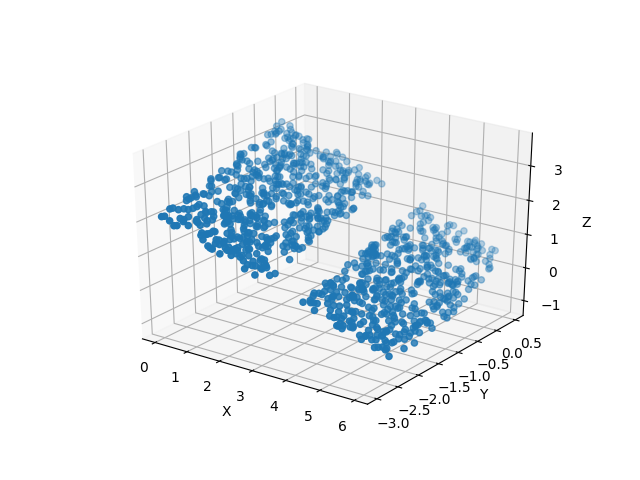
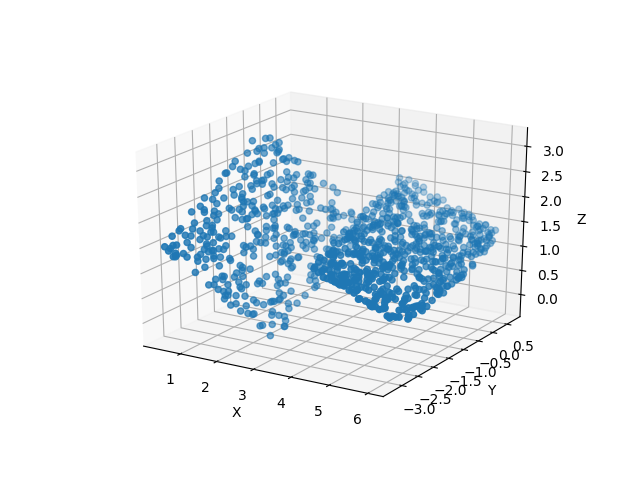
That example rotated both Collimator Plates 45 degrees about the axis <x,y,z> = <1,1,0>, note that the centers of the Plates are not in the same place, they have also been rotated. By passing in a list of theta values, we can rotate each component a separate angle:
from prtp.Combination import Combination
from prtp.Sources import CircularBeam
import astropy.units as u

c = Combination()
col = CollimatorPlate(4*u.mm,0*u.mm,3*u.mm,
   0,0,1,0,1,0,l=3*u.mm,w=3*u.mm)
c.addComponent(col)
col = CollimatorPlate(0*u.mm,0*u.mm,3*u.mm,
   0,0,1,0,1,0,l=3*u.mm,w=3*u.mm)
c.addComponent(col)

c.defineRotationPoint()

# Note the list syntax, we need to add the unit to the list,
# we cannot just use a list of values with units
# c.rotate(theta=[30*u.deg,60*u.deg]) would not work
c.rotate(theta=[30,60]*u.deg,ux=1,uy=1,uz=0)

s = CircularBeam(num=10000,rad=6*u.mm)
rays = s.generateRays()
c.trace(rays)

rays.scatter3d()
Trace
trace() is the most important function in any Component, and the Combination is no exception. When trace() is called, the input Rays will be traced to the first component in this Combination. The rays which hit the first component will be saved, while the remaining rays will be backed up to their original positions and traced to the second component. The rays which hit the second component will be saved and the entire process repeats for every component in this Combination.
In the end, rays which did not hit any component will be removed.
It is important to note that the Rays will be traced to the Components in the order that they were added to the Combination, so the user must be careful if the components overlap to make sure that they are added in the correct order.
trace() takes the following arguments:
- rays - The rays object that you want to trace, it is not returned, but is modified in place by the call to this function
- considerweights - A boolean that dictates whether or not the rays are weighted. This is True when things like quantum efficiency of detectors or reflectivity of Gratings is being considered. Defaults to False
- eliminate - A string, if it is equal to ‘remove’, photons which miss every component in the Combination will be removed from the Rays object. If it is any other string, photons which miss every component will have their x-positions be set to NaN. Defaults to ‘remove’.
The function trace() returns a tuple containing information about the Combination’s efficiency, this tuple is used by Instrument objects.
For examples, see any of the motion examples on this page.